I’ve had plenty of discussions with mercurial fans, and one argument that always keeps poping up is how mercurial branches are superior. I’ve blogged in the past why I think the branching models are the only real difference between git and mercurial, and why git branches are superior.
However I’ve noticed J. H. Woodyatt’s blog post Why I Like Mercurial More Than Git More On Mercurial vs. Git (with Graphs!) has become quite popular. I tried to engage in a discussion in that blog, but commenting there is a painful ordeal (And my comments have been deleted!).
So, in this blog post I will explain why mercurial branches are not superior, and how everything can be achieved with git branches just fine.
The big difference
The fundamental difference between mercurial and git branches can be visualized in this example:

In which branches is the commit ‘Quick fix’ contained? Is it in ‘quick-fix’, or is it both in ‘quick-fix’ and master? In mercurial it would be the former, and in git the latter. (If you ask me, it doesn’t make any sense that the ‘Quick fix’ commit is only on the ‘quick-fix’ branch)
In mercurial a commit can be only on one branch, while in git, a commit can be in many branches (you can find out with ‘git branch --contains‘). Mercurial “branches” are more like labels, or tags, which is why you can’t delete them, or rename them; they are stored forever in posterity just like the commit message.
That is why git branches are so useful; you can do absolutely anything that you want with them. When you are done with the ‘quick-fix’ branch, you can just remove it, and nobody has to know it existed (except for the fact that the merge commit message says “Merge branch ‘quick-fix'”, but you could have easily rebased instead). Then, the commit would only be on the ‘master’ branch’.
Bookmarks are not good enough
Mercurial has another concept that is more similar to git branches; bookmarks. In old versions of mercurial these were an extension, but now they are part of the core, and also new is the support for repository namespacing (so you could have upstream/master, backup/master, and so on).
However, these are still not as useful as git branches because of the fundamental design of mercurial; you can’t just delete stuff. So for example, if your ‘quick-fix’ bookmark didn’t go anywhere, you can delete it easily, but the commits won’t be gone; they’ll stay through an anonymous head (explained below). You would need to run ‘hg strip‘ to get rid of them. And then, if you have pushed this bookmark to a remote repository, you would need to do the same there.
In git you can remove a remote branch quite easily: ‘git push remote :branch‘.
And then, bookmark names are global, so you can’t push a branch with a different name like in git: ‘git push remote branch:branch-for-john‘.
Anonymous heads
Anonymous heads are probably the most stupid idea ever; in mercurial a branch can have multiple heads. So you can’t just merge, or checkout a branch, or really do any operation that needs a single commit.
Git forces you to either merge, or rebase before you push, this ensures that nobody else would need to do that; if you have a big project with hundreds of committers this is certain useful (imagine 10 people trying to merge the same two heads at the same time). In addition, you know that a branch will always be usable for all intends and purposes.
Even mercurial would try to dissuade you from pushing an anonymous head; you need to do ‘hg push -f‘ to override those checks.
The rest of the uses of anonymous heads were solved in git in much simpler ways; ‘git pull’ automatically merges the remote head, and remote namespaces of branches allow you to see their status after doing ‘git fetch’.
Anonymous heads only create problems and solve none.
Nothing is lost
So, let’s go ahead with jhw’s blog post by looking at his example repository:
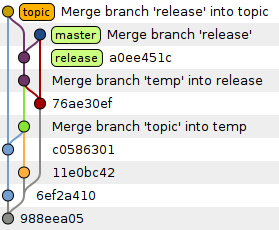
According to him, it’s impossible to figure out what happened in this repository, but it’s not. In fact, git can automatically find out what is the corresponding branch for the commit with the ‘git name-rev‘ command (e.g. ‘release~1‘).
Now let’s assign colors based on the output of ‘git name-rev‘:

The colors are exactly the ones that jhw used for his mercurial example.
Now the only difference is that there is no ‘temp’ branch, but that is actually good; it was removed. Why would we want to see a branch that was removed? We wouldn’t. Either way, the information remains; “Merge branch ‘temp’ into release” says it all; that all those commits come from the ‘temp’ branch.
Of course, one would need to manually look through the commit messages to find those removed branches, but that is fine, because you would rarely (never?) need that. And if he really needs that information readily, he can write a prepare-commit-msg hook to store the branch name the commit was originally created from.
Real use-cases
jhw tried to defend the need for this information by presenting some use cases:
A more clever rebuttal to my question is to ask in return, “Why do you need to know?” Let me answer that preemptively:
A) I need to know which branch ab3e2afd was committed to know whether to include it in the change control review for the upcoming release
It’s easy to find out what commits are relevant for the next release with ‘git log master^..release‘:

But then he said:
I didn’t ask for a list of all the commits that are currently included in the head of the branch currently named ‘release’ that are not included in the head of the branch currently named ‘master’. I wanted to know what was the name of the branch on which the commit was made, at the time, and in the repository, where it was first introduced.
How convenient; now he doesn’t explain why he needs that information, he just says he needs it. ‘git log master..release‘ does what he said he was looking for.
B) I need to know which change is the first change in the release branch because I’d like to start a new topic branch with that as my starting point so that I’ll be as current as possible and still know that I can do a clean merge into master and release later
Easy; ‘git merge-base master^ release‘, that would return ‘master~1’ (76ae30ef).
But then he said:
I didn’t want to know the most recent commit included in both the currently named ‘master’ and ‘release’ heads, because that may have actually occurred either prior to, or after, the creation of either the branch currently named ‘release’ or the branch currently named ‘master’.
And again he doesn’t explain why on earth would he need that.
To find the most current commit from the ‘release’ branch that can also be merged into ‘master’ cleanly you can use ‘git merge-base‘; the first commit of the ‘release’ branch doesn’t actually help as it has already diverged from ‘master’ and it’s not even “as current as possible” as there will probably be newer commits on the release branch.
Either way, if he really wants that, he can pick any commit that he wants from ‘git log master..release‘.
C) I need to know where topic branch started so that I can gather all the patches up together and send them to a colleague for review.
Easy: ‘git send-email --to john release..topic‘.
But then he said:
I didn’t want to know all the commits present in the head of the branch currently named ‘topic’ that aren’t present in head of the branch currently named ‘release. I wanted to know the first commit that went into a branch that was called ‘topic’ at the time when the change was committed. Your command may potentially include commits that were in a different branch that wasn’t called ‘topic’ at the time.
Why would you send patches for review that are dependent on commits your colleague has no visibility of? No, you want to send all the patches that comprise the ‘topic’ branch, doing anything else would be confusing
If for some reason you don’t want to send the patches that were part of another branch, you can select them out with ‘^temp’.
Conclusion
All the use-cases jhw explained are supported just fine in git, he is just looking for corner-cases and then complaining because we would need to do extra stuff.
I have never seen a sensible use-case in which mercurial “branches” (branch labels) would be more useful than git branches. And bookmarks are still not as good.
So git branching model wins.
 Felipe Contreras

Pingback: Mercurial vs Git; it’s all in the branches « Felipe Contreras
I have wanted to know what commit a long-lived topic branch was based against before. I probably should have done “git rev-list trunk..topic | tail -1” to find a commit near the beginning of the topic’s life, but that is a little klugey. In some cases (when the topic depends on another topic that is also not merged to trunk) it gives the wrong answer.
So there are situations where git’s branching model is not perfect. It would be nice if branches could optionally also store their starting-point information.
LikeLike
@Jonathan It seems what you are looking for is ‘git merge-base’, which would output the same as ‘git rev-list trunk..topic | tail -1’, but I wonder why would it give a wrong answer; if a topic depends on another topic then those commits are also not part of trunk, so they would show on the list. This is the same as ‘topic ^trunk’, which again, will still show commits not reachable by ‘trunk’.
In any case, if you truly want to find the branch point:
[alias]branch-point = !sh -c 'merge=$(git rev-list --min-parents=2 --grep="Merge.*$1" --all | tail -1) && git merge-base $merge^1 $merge^2'
See stackoverflow‘s answers for this.
I still don’t see why you would need this though; it seems to me you would need this information rarely (at best), so it really doesn’t make sense to complicate the branching model just for this corner-case.
LikeLike
This blog post makes me want to stick to mercurial even more.
Especially your first point that commits should be allowed to be deleted and history hidden. That defies the whole purpose of a vcs.
And those git command lines’ syntax are just insane.
LikeLike
@datgam
Don’t put words in my mouth. I didn’t say anything like that.
I said you can do anything you want, not that you should.
You can disallow such behavior if you want, just like some mercurial projects disallow ‘hg push -f’. Nobody is forcing you to use, or allow such features.
And you can delete commits in mercurial, and hide history in mercurial as well. You have ‘hg strip’, ‘hg rebase’, ‘hg commit –amend’, and the mq extension. Don’t try to paint it as something that only happens in git.
Of course, you probably see a lot of commits that have been cleaned up by such extensions (or don’t see), it’s just that you never notice (how could you?).
In fact, I could clone a mercurial repository in git, and remove and transform all the commits I want as much as I want, and then push the pruned result to mercurial.
You would never notice that history changed in my repository.
LikeLike
I don’t know mercurial that well to be able to add anything relevant to this post. I just want to emphasize that just the fact that in mercurial a branch can have multiple heads was enough to make me totally confused and give up with it.
@dagam Deleting commits and branches makes perfect sense. Sometimes I push some commits in a WIP branch just to save my work.
LikeLike
FelipeC wrote:
> @Jonathan It seems what you are looking for is ‘git merge-base’
That works for branches that are linear sequences of commits that never merge back from trunk.
> I still don’t see why you would need this though
You have never had a question about history like this one? You have never met an overly curious person?
Here’s a better example than the one I gave: imagine that I have a minor topic branch, consisting entirely of linear commits, based against origin/master. Unfortunately origin/master is frequently rebased. If my local repository remembered where the topic branch was based, I could list commits unique to my topic and rebase them against origin/master at any time. Since it doesn’t, I need to (a) be disciplined about making sure to rebase every time I fetch from origin (so origin/master@{5.minutes.ago} represents the base after a fetch), (b) be disciplined about making sure to update a separate “base” local branch each time I rebase (so base represents the base regardless of intervening fetches), or (c) tolerate inexact detection by “git cherry”.
LikeLike
@Alberto Mardegan: Agreed on deleting history.
Here’s another use case for rewriting history: what happens when my long lived topic branch spans for an experimental features spans 100+ commits and mostly consists of “Lets try this…” and “Woops, that didn’t work, Reverting commit 1a2b3c4d5”? Most projects wouldn’t want that noise stuck in the history to live forever, so I could easily `git rebase -i my_topic~25`, and then squash all of the useless commits down into the relevant parts that remain, and then merge into master.
Rewriting history has it’s purpose. Just because you can use a destructive tool to do something doesn’t mean you always have to do it. Git allows you, the developer, the option.
LikeLike
@Jonathan
That’s true. But that’s the common case.
The amount of questions a person can ask is infinite… the amount of questions that are sensible and useful are not.
No, you don’t need to that, it’s all handled automatically by git:
*
git pull --rebase*
git fetch; git rebase origin/masterGit would automatically find all the commits in ‘topic’ that are not in master, and ignore the merges from master to topic. You don’t even need to specify the merge-base, or branch-point, or last fetch, or whatever.
How is that “inexact”? Saying so doesn’t make it so. Show some proof.
Here:
git init $repocd $repo
echo "test" > README
git add .
git commit -a -m "Initial commit"
git checkout -b topic
echo "topic" >> README
git commit -a -m "Commit on topic"
git checkout master
echo "master" >> README
git commit -a -m "Commit on master"
git checkout topic
git merge -m "Merge branch 'master' into topic" master
git mergetool
git commit
echo "topic" >> README
git commit -a -m "Commit on topic"
Rebasing ‘topic’ on top of ‘master’ would find the two commits from ‘topic’ that are missing in ‘master’.
Do you actually have an example that doesn’t work?
LikeLike
Yes, “git pull –rebase” implements a compromise between (a) and (c). Take your favorite patch set from Linux and try backporting it or forward porting it with “git rebase” to a release a few years earlier or later if you would like to experience the patch that “git cherry” reads having insufficient information to recover the correspondence between original and rebased commits. Maybe you have been lucky enough to work with projects that don’t reorganize their code much.
LikeLike
@Jonathan
There would not be any problems forward-porting the changes, which is the common use-case. I just tried. I don’t know why you say it’s “inexact”.
Back-porting would need a merge base, yes, but the common case is when ‘master’ is not merged back to the topic branch, so ‘
git merge-base‘ can be used.Either way, in the rare situation that you have a complex branch, and you need to back-port, you could use any of the methods to find a branch-point, or you can just run ‘gitk’ and find out the relevant commit. It doesn’t happen often, so it’s not a big deal.
However, it’s not hard to follow certain practices to make it easier to work to rebase branches by using upstream tracking branches:
git checkout mastergit reset --hard v3.3
git checkout -t -b topic master
git cherry-pick cbcde05
git cherry-pick d2c0077
If I do ‘
git rebase --onto=v3.4‘ git would automatically find the upstream branch (master), and do master..topic, and rebase that on top of v3.4. Exactly the same would happen if you do –onto=3.2.Of course, you should move ‘master’ to v3.4 only after rebasing your branches, if you do it before they git would go through all the commits and figure out which were already merged and which not (it’s not “inexact”), which might take a long time in the particular case of the Linux kernel repository.
Anyway, if you really really need this, what’s wrong with this code to find the branch-point?
merge=$(git rev-list --min-parents=2 --grep="Merge.*$1" --all | tail -1) && git merge-base $merge^1 $merge^2Maybe you are assuming too much.
https://www.ohloh.net/accounts/felipec
LikeLike
I think you misunderstood what I wrote. I was saying it is not uncommon for a cherry-pick to change the patch-id of a commit.
LikeLike
@Jonathan
I don’t know what you mean by “patch-id”, but ‘git rebase’ is able to figure out when patches are cherry-picked.
Either way, this is a red herring; a base commit would not help ‘git rebase’ to figure out if the patch has already been applied; quite the contrary; if a base commit is specified, there would be no checks to see if the patch has already been applied or not.
LikeLike
@Jonathan All right, after discussing my code to find the branch point in the mailing list, it’s now clear to me that there’s a limit to what you can achieve with it.
An example of this limitation is easy:
- A - B (topic)
   \
    C (fix)
Here it’s impossible to know if ‘A’ was created first from ‘topic’ or ‘fix’; it doesn’t matter how many algorithms you use.
The ‘git name-rev’ command that I used in my post to find out from where the branches the commits came gives generally good results, but it relies on merges and distance from references, so it’s not reliable.
A list of ‘tails’ references would solve this problem without the need for mercurial branch labels.
It might make sense to add this functionality to git.
But I still maintain that the usefulness of this is marginal at best; most people have been able to use git just fine so far; it’s not hard to fire gitk or do a bit of ‘git log’ queries to figure out manually what is the branch point.
LikeLike
Ah man, I’m so glad I use mercurial.
“I just want to emphasize that just the fact that in mercurial a branch can have multiple heads was enough to make me totally confused and give up with it.”
So don’t do that then. This is what hg heads –topo is for. As far as I’m concerned, a branch not being a permanent, immutable part of history was enough to completely confuse _me_ and make me give up on git.
That’s on top of git’s arcane syntax & semantics.
LikeLike
That’s irrelevant; he can choose to ignore certain heads, but they would still be there; ‘hg view’ would still show them by default; ‘hg log’ would show them, and ‘hg push’ would still fail.
At the very minimum he would need to be aware that is going on, and that alone is a headache. Most likely he would need to merge these at some point or another.
So, branches being dead simple confuses you?
This smells like trolling.
This has nothing to do with the topic at hand; git branches. So this is a strong indication you are just trolling.
If you make another comment that contains more comments without any argumentation, and red herrings, than anything else; I’ll just remove it.
LikeLike
“If you make another comment that contains more comments without any argumentation, and red herrings, than anything else; I’ll just remove it.”
Hah. Brilliant way of coping with things.
“So, branches being dead simple confuses you?”
They’re dead simple. That is until you start pulling and pushing from other peoples repositories who may or may not have moved around which branches refer to which heads. (I _still_ don’t fully understand this)
“That’s on top of git’s arcane syntax & semantics.” “This has nothing to do with the topic at hand; git branches.”
It absolutely does – that’s my point. It is _particularly_ the combination of the two that is the killer. Talking about the branching model on its own is a bit of a pointless exercise in abstract argument. git & its semantics & its branching model are for all practical purposes inseparable.
LikeLike
Robert
It’s not coping with anything; if your comments are not useful why should I allow them?
So you don’t understand the concept of remote branches? Is that it?
What is difficult about ‘origin/master’? ‘master’ branch in ‘origin’ repository. It’s a different branch, you don’t get that?
If you don’t; here, read: http://git-scm.com/book/ch3-5.html
They are not. We are talking about the branching model. Period.
You want to talk about how git ate your dog; go somewhere else.
LikeLike
I like Mercurial marginally better than Git mainly because it simpler. Its also because most of my jobs I prefer rolling releases and don’t need long running release branches.
I like Hg better because:
* No staging area (I see the value but 99% its annoying to me)
* Rebase sort of scares me (I know hg has it also but its not common practice)
* Because you can get so creative with git and its part of the culture I feel like have to overly think on every damn commit/push with git.
* Bitbucket is cheaper (private repositories… and at the time they didn’t have git).
* Its easier to teach new developers because it feels more like svn (see no staging).
For large OSS libraries where you need release branching I can see how Git is the marginal better choice.
But for modern development particular for mobile apps and web apps your doing rolling releases. You don’t need named branches. I actually try avoid them like the plague. I like one branch that way your teams is focused on the one and only branch that matters. If you really need to experiment go fork/clone a repo.
LikeLike
@Adam Gent
You don’t have to use it.
You don’t have to use it.
You don’t have to.
It’s cheaper to setup your own repositories. And yeah, bitbucket supports git.
It’s even easier to remain with subversion.
But if you are switching away from subversion, perhaps the fact that a DVCS is similar to subversion isn’t actually a good thing.
LikeLike
One feature that’s sorely missing in Mercurial is the ability to make topic branches. The recommended way of emulating them is to make a separate clone for each topic/feature, but that seems like overkill. If I’m working on 3 bug fixes and implementing a new feature, I should make 4 clones of my repository? How would I allow other people to see my progress / collaborate? Send them an email with the locations of the clones-du-jour?
Named branches almost work, except for the fact that they exist for all of eternity. I know they can be “closed”, but that just allows them to be ignored when doing a branch listing. This can quickly get out of hand if there’s a lot of bug fixes / features added throughout the life of the project.
I also tried bookmarks, but they are *not* the same thing at all. If you start a new bookmark, for instance from the head of the default branch, and commit some random changes, guess what? The entire default branch gets updated along with the bookmark. Your fellow collaborators will suddenly see a half-arsed commit in the default branch, which may leave it in an unuseable state. The problem is that the bookmark is just a reference to a particular head of your default branch. It’s not an independent entity that sits on top of your default branch – it *is* the default branch. There is a way around this, by explicitly bookmarking the true (working) head of the default branch. You could call it something like “master” so people know it’s the important head. At this point, though, you’d have to forego the “named branch” model entirely and work with these bookmark names instead.
What I ended up doing instead was using hg-git (http://hg-git.github.com) to clone to a local Git repository, and put my topic branches in there. When I’m finished a feature, I simply merge it into my Git master branch, then push my changes to the hg side. It’s far from ideal, but it allows me to use a workflow that’s not natively supported by Mercurial, and my fellow collaborators can continue using the tools that work for them.
LikeLike
@Mike:
frankly, topic branches workflow is a piece of cake with mercurial 😉
$hg update release_branch
$hg branch private_myfix
$hg update release_branch
$hg rebase -b private_myfix # you can even collapse your changes with –collapse to one commit.
$hg push -b release_branch
The only thing you have to pay attention to: Never, NEVER EVER push your private branches outside of your repository. Allways use -b switch for pull/push operations if you’re using topic branches workflow.
This advice is actualy the same as for Git 😉
http://www.mail-archive.com/dri-devel@lists.sourceforge.net/msg39091.html
LikeLike
PS:
Wordpress ate some lines
It should look like this:
$hg update release_branch
$hg branch private_myfix
$hg commit
…
$hg commit
$hg update release_branch
$hg rebase -b private_myfix # you can even collapse your changes with –collapse to one commit.
$hg push -b release_branch
LikeLike
@Rustboy
That’s kind of what I’m doing at the moment: keeping my topic branches in a separate repository, and pushing to the main repository when changes are finalized. The only difference is I’m using git as the 2nd repository instead of mercurial, because it’s much easier to clean up defunct branches. My topic branches are intended to be shared with other people, so I can’t just nuke-and-clone to tidy things up. With git I can quite easily remove old branch references, without messing up other peoples’ copies of the repository.
If I had no intention of sharing my topic branches, then your version would be a better choice. However, in either case I still need a second repository in order to emulate topic branches, which I had hoped to avoid 😦
LikeLike
I’ve used both.
I find it utterly ridiculous that one DCVS has to “win” over another.
One of the key opening statements states about git branches: “nobody has to know it existed”. To me, for my tastes, I like that branches can’t just go poof in the night.
And, your ending statement like “So git branching model wins” seems to be missing the usual school ground follow-up addition of “and my father can beat your father, so there!” This may get me deleted, since you’ve threatened it, but the whole article is mired in opinion-as-fact.
All the debate (as it rages back and forth for years now) has shown me is that there is 99% alike, 1% not alike, and that 1% is mostly irrelevant because the debaters have pooh-pooh each other for even bringing it up and label the other as being too subjective.
What a waste of energy…
LikeLike
One doesn’t “have” to win, but git happens to be better.
I will not reply to the rest, which is basically name-calling, no arguments or counter-arguments.
LikeLike
The entire first three sections are “anything different from my habits is stupid”. What an utter waste of time.
LikeLike
+Kiru
It has absolutely nothing to do with my habits; the mercurial way is supported perfectly fine by git, in fact, any workflow is supported by git. Mercurial doesn’t support all workflows; that’s the difference, and it has nothing to do with me.
LikeLike
To me, Git is more than just a DVCS, it is a powerful development tool. This power mainly comes from Git lightweight branch model, which I use to continuously rebase / cherry-pick / re-order my local branches before pushing upstream.
My workflow is basically:
1) hack, hack, hack
2) rebase/re-write/cleanup history
3) push upstream / ask upstream to pull from me
I have multiple dev. platforms, each with their own copy of the same repo. With Git it is very easy to push “temporary / local” dev. work to all these platforms. I have no problem to push lots of “wip” commits because I know that later on I’ll be able to clean up the history very easily (while still guaranteeing no regression thanks to git diff). I have the best of two worlds: fast and agile dev. cycle, clean and guaranteed final results.
To my opinion developers that use Git w/o rebasing or rewriting history are just completely missing a big part of Git power. At first I was a bit scared by history rewrite (I thought it was heresy), but actually I was mistaken and now I do not want to do w/o it.
LikeLike
Pingback: Сыр Российский » говорящий с машинами » @cblp: *программирование *Mercurial *git
I think it’s doing a disservice to say git is easy to learn. I’ll admit it’s not. But any tool worth learning takes time, and you’re rewarded in the end.
I didn’t really ‘get’ git until I looked at what it does at a low level. I think people should do that, then do a simple git implementation yourself. I did it in 400 lines of python. It’s a really dumb implementation that only did add, commit, checkout. Every change was a new blob etc. All the hard stuff in git is optimizing those things and adding features.
Git is just fundamentally different at the low level. It’s a snapshotting, distributed, deduping, filesystem. It just so happens that such a filesystem is good for vcs. Once you get that, you can do some incredible things and they become second nature. You end up using these ‘weird’ features multiple times a day.
LikeLike
+Amit
Are you coming from traditional systems like CVS or Subversion. Maybe it’s not easy for you, or the people you know, but 55% of the people that responded to the Git user survey of 2012 found it reasonably easy:
https://www.survs.com/results/QPESOB10/ME8UTHXM4M
I agree that people should look at the low level, which is why I recommend Git from the bottom up.
ftp://ftp.newartisans.com/pub/git.from.bottom.up.pdf
LikeLike
Thanks for the link. ftp link wasn’t working for me but works for http:
Click to access git.from.bottom.up.pdf
LikeLike
I am late to the party, but I would just like to draw emphasis to one point: Mercurial being easy to learn for SVN users is not a good thing. I disliked Git for the first while because I was frustrated with how different it was. I went back and studied Git’s internals a little bit and suddenly realized that my mental model was completely wrong. I believe it was Scott Chacon who said that it is best to just forget everything you know about version control when learning Git. I wish I would have known that before.
Now that I am familiar with Git, I would not have it any other way. Mercurial’s tendency to behave like Subversion works so much against it. It gives developers a false sense of comfort because of all the familiar surroundings, but it begins to sabotage their understanding of what’s really going on. Blurring the lines between a local lineage and a remote lineage only serves to complicate the issue.
I would also like to point out that it is actually quite difficult to truly purge commits in Git. Git is not as careless with data as Mercurial users make it out to be. After rebasing a branch, the old non-rebased commits are still there; the branch pointer just got moved. If someone deletes a remote branch, my local copy of that branch stays until I prune. From there, being able to edit history is actually critical. If sensitive information slips into a commit, we can remove that commit and rebuild the history. Also, as has been mentioned several times before, I want to be able to share my one-off topic branches, but I want to be able to nuke those branches when they prove unfruitful. Why distract the team with the noise of abandoned past branches?
Also, Mercurial embedding branch details into the commits is a bug, not a feature.
LikeLike
hey, both are excellent DVCS. Choose whatever suits you better. We use Mercurial primarily because it integrates with Windows better. Also, our team is small so the history rewriting capabilities and practices of Git, which require time and resources, are not needed (I’m not saying that the same is not available in Mercurial via extensions though). That’s the other reason why we chose Mercurial – because of Linus Torvaldis 🙂 Don’t get me wrong. I adore the guy. He is a genius. But, he is (as all geniuses) a stubborn SOB. He likes things done his way, and he made Git primarily for versioning Linux and we all know that for that purpose he uses a certain workflow that Git complements the best. However, his workflow does not suit all projects equal. Mercurial, in my view, is MUCH MORE FLEXIBLE about that, and also it is easier to understand and extend (you only need to be fluent in python).
LikeLike
Both are good, but one is better.
Git supports absolutely all workflows perfectly.
LikeLike
Pingback: An in-depth analysis of Mercurial and Git branches | Felipe Contreras
Yes, the better one is Mercurial.
LikeLike
Seems like your comments getting deleted on other posts/boards/blogs is not an uncommon thing for you? Methinks you are the common denominator and don’t take stock that your opinions are your own and do not have to be adopted by others? Handle rejection well?
LikeLike
> Both are good, but one is better.
“Better” is in the eye of the beholder. Both Git & Mercurial are “better” depending on who you ask and what you consider, and it’s fine. It’s good that both exist because both have things to learn from the other one, and eventually both becomes better products.
There’s a reason why in nature the more diversity there is, the healthier an environment is.
LikeLike
The opposite of pull in git is push…. not!
Lol. Git is like Linux, decent to use, fast, etc., just not clean and if you start having a problem, you end up wiping everything.
LikeLike
Consult your Ophthalmology doctor to learn about how to use lenses properly,
its maintenance and hygiene. This is important, as most people will read
their emails and newsletters only if they feel that they will be able to get informative content.
In addition, avoid driving until your vision is completely clear
and focused.
LikeLike
I find your explanation quite balanced.
Although having worked with Git for quite some time, I have yet to grasp all the concepts – I am working on that (Think Like A Git didn’t help too much either, I knew the DAG basics).
My main contention with Git, though, is that whenever I try to use it, at least 50% of the time it flips me a bird and then what? Mercurial will try to be helpful and the documentation of Mercurial convinces much more than that of Git, because it’s not the “design document” for the software, but rather a manual for the user of the software.
I also dislike the horrible concoction that Git is on Windows (no matter which of the alternatives you use). Mercurial shines (or sucks, whichever way you want to see it) equally on all platforms. Git not so much. And while the Unix way of using little tools and chain them is a very nice method while on Unix, it becomes painful on Windows.
Mercurial convinces not (only, but also,) through the feature-richness, it mainly convinces through usability and documentation that is quite a lot superior to Git’s.
LikeLike
@workworkwork I agree on all those points. Git’s documentation and UI are very much lacking, and the support in Windows is not as good as it should be. It shouldn’t be hard to fix these problems, unfortunately due to the culture of the developers, it is =/
LikeLike
Quite a bit of arguments back and forth here. Use the tool which you like, and if you find it limiting, try the other one. Anyway, what got me was the author saying
“I tried to engage in a discussion in that blog, but commenting there is a painful ordeal (And my comments have been deleted!).”
but then in the comments saying
“if your comments are not useful why should I allow them?”
Perhaps the author of the other article thought the same? I have nothing against git, but this attitude made be form a bias against the author. Comments should not be deleted, no matter how stupid they may be. Let the reader decide what is useful or not (downvote and hide, but still allow it to be shown).
Anyway, who cares what everyone likes as long as they are happy with it. But don’t be a hypocrite. You lose all your credibility that way.
LikeLike
I gave a reason, the other author did not. And my comments were technical.
LikeLike
Thanks to your blog posts, I think I’ve finally worked out what a Mercurial branch is. It’s a collection of git like branches that are stored on a hypothetical shared SVN server. Because the server is shared commits can only be added to it never reverted or changed. Because you don’t (actually can’t) merge every commit the SVN server creates multiple heads within the branch. Only when communication between the copies of THE REPOSITORY is resumed do the heads get physically copied so the merge can happen and because it’s an SVN repository it has to be done in the form of more (merge) commits.
The thing I see here is that there is still the concept of “THE REPOSITORY”, the one true history, the one true path and this is given the name of the branch you’re using (eg “default”) and it’s obviously important because it’s the name of the shared server … you know the one that doesn’t exist anymore.
OTOH; there’s no such thing as a branch in Git. There is only a pointer to the HISTORY, and like real history it’s only as immutable as the number of people who know about it. This gives us the ‘Official History’ and the real histories. The real histories happen in everyone’s individual repositories where it’s explicitly recognised that history will be cleaned, polished, sanitised. If not within the VCS then before the VCS even gets to see it. Only this ‘nice’ history makes it into the ‘Official history’. This is just like Mercurial, except Git actually supports it; Mercurial requires that you do your cleaning in a repository that isn’t “THE REPOSITORY”, like the ‘MQ’ extension or even on the filesystem.
So for Git, you can commit to your repository very very frequently. You actually can save the true complete history. If you save often enough you can do things like reverting just a few minutes work. It becomes part of your workflow like the ‘undo’, and ‘redo’, keys in your editor. Only later do you convert this into the ‘Official history’.
OTOH, Mercurial, well, it’s nice, but it distributes the repository not the histories so it’s VCS on a distributed database, not a distributed VCS.
IMO, Linus made a very good choice, I imagine it’s been forgotten but I expect it was mostly accidental, but then that’s history for you.
LikeLike
@robert
Your description is quite good.
It also explains why some of my coworkers find Mercurial simpler than git: the concepts are simpler.
– There is one “Repository”,
– You have a local copy of the “Repository” that you change,
– Then, later, at some point you synchronize with another version of the “Repository”.
Yeah it’s like a repository + DropBox. That’s all you need to know.
Of course, mercurial branches work well from them: there is “Alice” branch and then there is “Bob” branch, and sometimes, when they are more avanced, there could be more branches like “Alice-new”.
To be honest they get a little confused when the “One True Repository” abstraction falls apart, but I just have to point them to “hg push –new-branch”
A VCS-on-a-distributed-database works extremely well for their projects. You have to understand that, in the extreme case, some of them are just editing text-format files (HTML, input to static site generators, Latex, …). Their alternative is to use DropBox and some file copying/manual merging, with some conventions for file names and versions.
(disclaimer: most of my time is spent with git — with some other coworkers. I could not care much about the debate hg-vs-git, most of the time, we really get bugged by something impossible to do easily in any of them, because it is just logically impossible to easily do in *any* DVCS).
LikeLike
Immutable history in HG had a bad effect on my team when we committed 12G of libraries into our repo at the start of the project. Those 12G were left there for years, causing man-months of overhead by my estimate.
At that time there were no way to safely trim first N commits in history (which is actually one of safest history manipulations possible).
Currently I am using GIT and I like it more than HG.
LikeLike
The simple answer why named branches in mercurial or branches in bazaar beat git branches is because your trunk/mainline/master turns into a series of merges that show very clearly when a topic branch was landed. You can easily see the big picture of the project with ‘bzr log’ or ‘hg log -b default’. You get exactly the information you need at the level you need it. If you want to dig into the details, you can dig into the history of what was merged in. It’s a thing of beauty.
Git branches are inherently ephemeral unless you set up a remote tracking branch. You might be able to use git log master..topic, but only in the case that topic exists in your local repository. By default when you merge changes into master and push upstream you’re going to lose the topic head pointer and this breaks down. There’s nothing in git that records what “topic” historically pointed to except the local reflog, which will get eventually garbage collected. So you can use git log master.. topic locally for a while and it will probably be correct (in the bzr or hg sense), assuming you haven’t monkeyed around with the DAG, but this breaks down on a team unless you’re only referring to tracking branches.
http://www.cs.cmu.edu/~davide/howto/git_lose.html
Also, git will turn any merge into a fast forward if it can. Unless you use –no-ff for merges to make sure you capture every branch as it lands into another branch as a distinct ref, all your refs get inserted linearly. In hg and bzr, the merges tell the story. In git, more often than not, the merges are noise when fast-forwards were not possible.
http://blog.jonathanoliver.com/my-new-best-friend-git-merge-no-ff/
So in git you have some options. You can set up all branches or at least any branch you assume there’s any chance you’d have to care about later as a tracking branch, and use –no-ff, and to be precise you could manually add the name of the branch in the commit message (or rely on git log master..topic being close enough) to simulate bzr’s or hg’s model, or you can go completely the opposite way and say merges are noise and rewrite history so the refs that end up in master represent whole bundles of opaque work so you end up with a straight line for a graph. Also, there’s the middle path of not doing anything and ending up with a history that’s near impossible to make sense of.
If you want a “clean” history in git, you’re forced to constantly make decisions:
Does this branch need to be a tracking branch so I can preserve the branch pointer across a team?
Do I need to do a merge with –no-ff so I can record when I landed something into another branch?
Do I want to rewrite history to clean it up?
If I rewrite, is it safe to squash refs? Will I ever need the detail I’m losing?
If I rewrite, have I ever shared what I’m going to rewrite and force other people into cascading rebases?
http://failex.blogspot.com/2013/08/rebasing-makes-collaboration-harder.html
It’s all nonsense
You can make git do more or less whatever you want depending on how well you understand the model and how much effort you’re willing to put in “crafting” a history, or you can use a tool like bazaar or mercurial that supports real branches and just do no manual work at all. They’ll capture everything correctly and make it possible to see as little or as much detail as you need to make sense of things on either a macro or a micro level.
Git has a thing it calls a “branch”, but in the sense that we use that term in other VCS, git doesn’t support branches at all.
http://duckrowing.com/2013/12/26/bzr-init-a-bazaar-tutorial/
LikeLike
Which is how it should be, and the vast majority of people agree. Git’s model won. Period.
LikeLike
I think the reason some people might want to know what branch a commit was made into at the time of the commit is; If you are using branch-per-feature workflow, and you wanted to answer the question “What feature was effort was this commit part of?” For example know that commit X was made on feature branch Y means to me that the commit was made because they were trying to implement feature Y.
Of course, these details could be captured in commit logs. But that would mean people would have to be disciplined enough to add such meaningful commit messages which is not always the case. The commit message usually says “Moved this class to some other namespace” But knowing that the commit was made on “feature Y” branch, that gives us context about it. we know understand that they were working towards that effort and that is why the commit was made.
LikeLike
You can find that easily if you name the merge as “Merge feature-a branch”, which is the default in Git.
LikeLiked by 1 person
The information provided by name-rev is not reliable.
Here’s what I get when I start committing on master, then switch to a
branch foo and finally merge foo into master:
* commit 48ccc26e9a464df0a2e838d2338e472acede0c1e (master) (HEAD -> master)
|\ Merge: 97ec8a6 cf1d596
| * commit cf1d596586a52f5902c498a2107ab3eb3f65685c (foo) (foo)
| |
| * commit 2787987c70c00e54d21f3ae8a8bd4ff9c55102c5 (foo~1)
| |
* | commit 97ec8a605921aeca0fce5ca691bbbe3ea9213ef7 (master~1)
|/
|
* commit 41beb6704c82243ff0f15ab74075d05c24f5fecb (foo~2)
As you can see, the root is misattributed to foo. So you simply got
lucky that you picked an example where this command actually provides the
same info as named branches, but the result can easily be false.
This graph is generated from the following commands (then trimmed):
git init foo
cd foo
echo 1 > 1
git add 1
git commit -m 1
echo 1.1 > 1
git add .
git commit -m 1.1
git checkout -b foo master~1
echo 1.2 > 1
git add .
git commit -m 1.2
echo 1.2.1 > 1
git add .
git commit -m 1.2.1
git checkout master
git merge foo
echo 1.2.1/1.1 > 1
git add .
git commit -m “1.2.1/1.1”
git log –graph –decorate –pretty=short | git name-rev –stdin
LikeLike
Yes, you are right. But you don’t need a tool to get the exact commits that you want, it’s easy to visualize and type the right Git command. Either way, I asked the author *why* would you want to get those commits in real life, and he never answered. It’s an academic exercise anyway.
For real life scenarios, Git commands give you exactly what you would need.
LikeLike
You’re right that Git cannot provide this information. However you also cannot get it from visualizing the history. Git cannot provide this information, because it does not keep it in any way. Otherwise I’m sure that someone would have already created a set of commands to retrieve it.
The example I chose is not the result of searching for a long time for a specific case where the information delivered by git is wrong. It is simply the first, most obvious example I tried. If people rely on the commands you provided in real life, they will get false information which could lead them to false conclusions.
Therefore I want to ask you to update your blog post and make this clear to prevent Git-users from relying on this. You say clearly that you think that people will never need this information. Please also make it also that they cannot get it. Otherwise someone might build a workflow to fulfil a specific requirement which needs this, since “Felipe Contreras said this would work”. Please make sure that they know that such a workflow would not be a good idea with Git because the information retrieved in this way is not reliable and can easily be wrong.
LikeLike
My point was to prove JHW’s assertion wrong. He put an example and he said it was *impossible* to figure out what happened in this repository, he was wrong, and I proved him wrong for that repository.
Moreover, such information is totally irrelevant, nobody needs it, and the proof is that Git is the clear winner on the DCVS wars, and still nobody needs this. When somebody actually wants to find out this information, it’s easy to do by just looking at the geography of the repository.
If this was somehow important, somebody would have introduced it to Git already. It’s not.
LikeLike
You claimed that “everything can be achieved with git branches just fine”, and this is a false statement. Therefore I’m asking you to correct it.
People tried to implement node-coloring-style branching on top of Git by putting the information into the commit messages. Github even added a centralized store of which commits belong to which pull-request. There are crutches around which don’t work reliably, so there clearly is a need for this information.
But it is not possible to get this from the “geography” of the repository. To allow for that, you need to record extra data when you commit. And git does not do that while hg does. Github actually stores additional information in a centralized way to assign commits to pull-requests. For Github this requires recording the history of the history. And all this would be much easier – or as in case of github: actually distributed – if the branch information where available for commits in Git.
LikeLike
> My point was to prove JHW’s assertion wrong. He put an example and he said it was *impossible* to figure out what happened in this repository, he was wrong, and I proved him wrong for that repository.
Huh. I thought your point was to refute JHW’s contention that Mercurial’s branching model is better than git’s.
If all you’re interested in is that one example repository, then yeah, he was wrong, you were right, you get the trophy, congratulations. But if that’s your point, almost all of your comments in this thread are irrelevant digressions, because they are not about that repository.
If your point is the larger issue about recovering the goals that were in play when a commit was created, the issue that most of your comments seem to be about, well then JHW’s example is irrelevant because it doesn’t actually speak to that issue. But on the other hand arnebab’s example is extremely germane and you have addressed it only by (a) “nobody needs it, and the proof is that […] nobody needs this” plus (b) “If this was somehow important, somebody would have introduced it to Git already.”
But then, if everything important was already in Git as of your writing that last November, there shouldn’t have been any new versions between then and now. Eh?
LikeLike
We just switched to Git a few months ago. We just had another mishap that makes us reconsider our decision. Git does not reliably know if a branch-line of commits is “the trunk” or a “branch” from something else. (E.g. FelipeC’s example from Jun 2012.) So there’s no way to write a hook to prevent someone merging a feature-branch back into ‘master’ where the author of the feature-branch accidentally originated their branch from something other than ‘master’.
The more we use Git, the more I see why people use “pull requests”, “rebase”, and “fast-forward”. Git makes a repo with branches in the history confusing; in general, people on the ‘Net regard it in fear and/or disgust.
Could it be fixed? Sure. Just mark the first commit in a new branch as the “branch root”. Long after the branch-tag has been deleted—long after the reflog has been purged—any tool could easily follow the DAG and reliably list only commits directly within a branch, given just one commit on the branch line.
LikeLike
@Nathan JHW contended that Mercurial branching model was superior than Git’s, and he used a specific repository to prove that, so that’s what I refuted.
If we are to have a meaningful discussion is has to be done point by point. I refuted all JHW’s points, so his contention is baseless. He can provide more examples, of course.
But JHW hasn’t answered my counter points, nor provided any more examples.
So no, nobody has shown that Mercurial branching model is superior, because it isn’t.
There hasn’t been a single Git release in which they make modifications to the branching model, because there isn’t any need.
Mercurial on the other hand has made modifications to their branching model, like for example with the introduction of bookmarks.
That tells you something.
LikeLike
@Granger Godbold Why would anybody want to prevent that?
I could have a branch called “general fixes” that branches from “master”, and I could have “fix 1” and “fix 2” branches on top of “general fixes”. I then want to merge “fix 1” to “master”. I have many options:
1) Rebase “general fixes”..”fix 1″ on top of master, and merge that
2) Merge “general fixes”, and then merge “fix 1”
3) Merge “fix 1” (which would merge “general fixes” too)
Yes, in Git branches are ethereal so it’s harder to detect mistakes like merging commits from multiple “branches”. But any time you merge a branch Git tells you exactly which commits you are merging.
Personally I never that that problem because I always rebase, so I always see only the commits I want to merge to master.
If you follow good practices, you are never going to have any problem.
LikeLike
@FelipeC – It’s obvious to me why someone *would* want to prevent merges where the changes weren’t based off the “expected” branch. This comes from experience working on teams where I’ve deployed and/or reviewed others’ code. It seems this is not something you have dealt with in the past, or at least you don’t care about in the present.
But I think you know this branch/merging situation is a problem because you use “rebase” to avoid it for your current workflow. Other people use “pull requests” to work around it. Everyone’s afraid of merging branches, so we jump through hoops to pretend all branches are magically created, worked on, and merged back in before any other commits happen on master.
It is a critical flaw to me that Git can’t natively tell the origin of branches in the DAG. Using a merge commit message to attempt to track it is a symptom of that design flaw; the tool has failed, so users must implement a workaround. It’s a big enough deal that I’m willing to deal with immutable branch-tags in Mercurial.
LikeLike
@Granger Godbold You can do a pull request of a branch that didn’t start on “master”. You can do a pull request of the wrong branch. You can do a pull request of a branch that has temporary commits by mistake.
You can do a lot of mistakes, and the best way to prevent those mistakes is by paying attention to what you are sending on your pull request. And the people doing the pull need to pay attention too.
If your team doesn’t check what’s in a pull request, not even the commit summaries, never mind the changes, and you need a tool to prevent something that is OK to do in most situations.
You have bigger problems.
LikeLike
@FelipeC – I’m sorry you didn’t or don’t care to understand. I won’t bother you anymore.
LikeLike
@Granger Godbold Sure. I’m the one that doesn’t understand.
Everyone is using Git, virtually has any problems with the branching model.
Yet a tiny minority like does have problems.
What is more likely, that Git is wrong and most people don’t realize that, or that your model is wrong.
Since you decided to give up, clearly it’s the later.
LikeLike
“However, these are still not as useful as git branches because of the fundamental design of mercurial; you can’t just delete stuff. So for example, if your ‘quick-fix’ bookmark didn’t go anywhere, you can delete it easily, but the commits won’t be gone; they’ll stay through an anonymous head (explained below). You would need to run ‘hg strip‘ to get rid of them. And then, if you have pushed this bookmark to a remote repository, you would need to do the same there.”
This is no longer accurate. “Changeset Obsolescence” has been part of Mercurial since version 2.3 (released in 2012, a few months after this post was written). With that, you can delete/modify commits without losing history, and without worrying that someone will accidentally re-push something you deleted: the delete/modify metadata is pushed along with the commits.
LikeLike
@taradinoc What does that have to do with anything? The point remains that deleting a bookmark doesn’t delete the commits.
LikeLike
@FelipeC
You can easily delete the bookmark and the commits at the same time, if that’s what you want: hg strip -B your_bookmark
But mainly I was responding to your statement that “if you have pushed this bookmark to a remote repository, you would need to do the same there”.
If you use changeset obsolescence (hg evolve), you don’t have to strip anything from the remote repo – just make your changes locally, and push when you’re ready.
LikeLike
You might also be interested in the new “topics” feature, which is still under development but seems pretty usable:
https://www.mercurial-scm.org/doc/evolution/tutorials/topic-tutorial.html
These are basically short-lived named branches. The topic name stays with the commit, but it disappears as soon as the commit becomes public.
LikeLike
Pingback: An in-depth analysis of Mercurial and Git branches | Felipe Contreras